Synphonos
A timecode generator that plays the show.
It plays your audio and sends SMPTE timecode locked to where that audio has got to. Press Play, and the console follows.
Windows 10 / 11, 64-bit · one file, no installer · free
What it does
It doesn’t follow the music. It counts it.
A lighting or video desk that runs from timecode needs something to tell it what time it is. Synphonos is that something, and it is also the thing playing the music — which is the point.
The timecode is not synchronised to the audio. It is counted from it, one sample at a time, in the same audio callback that fills the output buffer. There is nothing to line up, and nothing that can drift.
It generates timecode. It never reads or chases it.
- In
- Your show’s audio
- Out — audio
- LTC
- Out — MIDI
- MTC
WAV, AIFF, FLAC, Ogg Vorbis, MP3, AAC. Up to eight stems playing as one song.
Longitudinal timecode, on a channel of the same output device. Patch it into the desk’s timecode input.
Quarter-frame messages out of a MIDI port — to a console, or to another program on the same machine.
The window
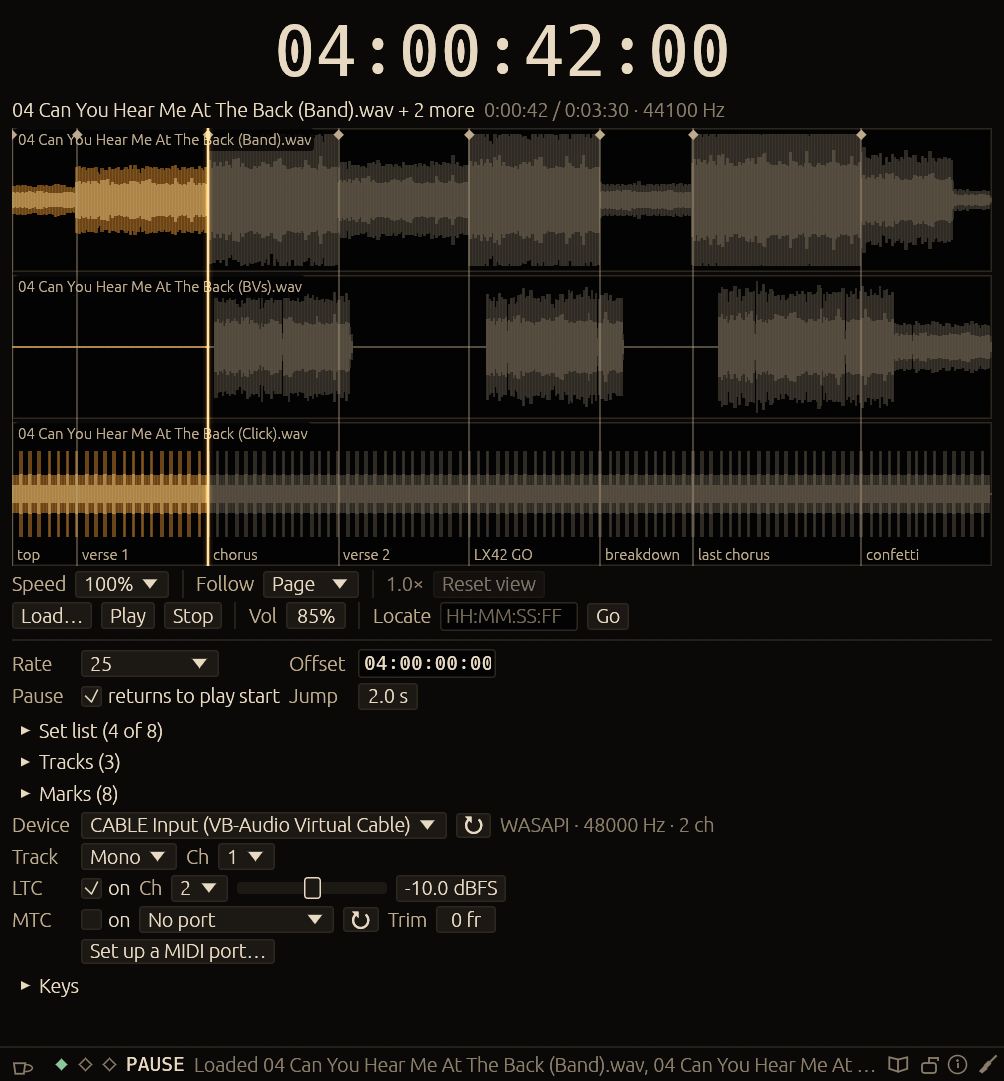
Dark and quiet, because it lives next to a lighting desk in a blacked-out room. Gold means one thing only: lit and live — the playhead, the readout while playing, the keys that are working.
The readout is the timecode going out, not the file’s position. Every stem gets its own waveform strip, sharing one playhead and one view. Ctrl and scroll zooms in until every frame boundary has a tick.
Six looks come with it, and the accent, ground and text can each be set to whatever your production wants.
Running a show
A set list, not a file
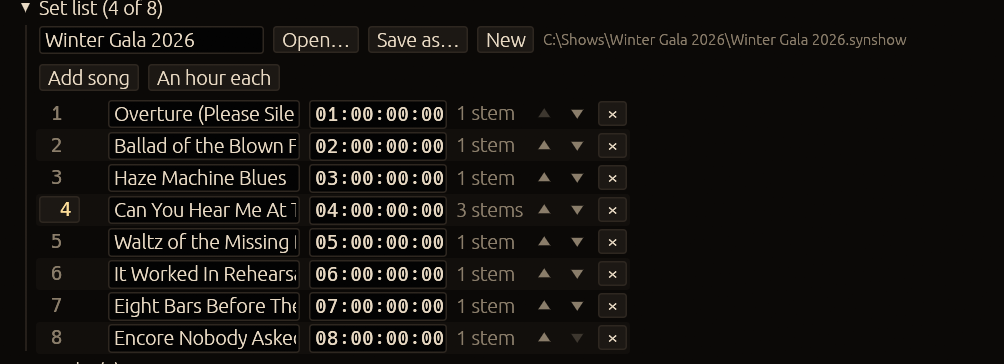
A show is the whole evening: songs in order, each with its own stems, start offset and marks. An hour each puts song 1 at 01:00:00:00 and song 2 at 02:00:00:00, so one song’s cues can never match another’s.
Keys that work from the desk
Tick a key and it keeps working while grandMA2 has focus, so the set runs from the console and nobody touches the timecode machine. Synphonos hands the keys back whenever its own window is in front.
Stems that cannot drift
Up to eight files play as one song — band, BVs, click. One transport, one position, one set of timecode. Each gets its own channels, so a click can go to the MD and nowhere else.
The lock
Runs the show without letting anything change it. Play, marks and levels keep working; stems, offsets, the frame rate and the running order freeze. Stop asks twice — Escape is the key a hand reaches for by reflex.
A backup rig in two minutes
The show file holds the set list and the marks; the device, the port and the keys stay with the machine. Copy the show folder over, open it, pick that machine’s device once.
Marks by name
verse 1, LX42 GO, last chorus — named points saved with the song, on Page Up and Page Down, or on a key of their own.
Specifications
Everything it is, in one table.
| Timecode out | LTC, −20 to 0 dBFS (default −10), and MTC quarter-frames with a −8 to +8 frame trim. Either or both, switchable while playing. |
|---|---|
| Frame rates | 24, 25, 29.97 NDF, 29.97 DF, 30 |
| Audio formats | WAV, AIFF, FLAC, Ogg Vorbis, MP3, AAC (.m4a, .mp4, .aac), MKV/WebM audio |
| Audio out | WASAPI shared mode, at the device’s own sample rate |
| Limits | 8 stems per song, 200 songs per show |
| Speed | 10% to 200%, like a tape — timecode keeps to the track |
| On your machine | Settings and shows in %APPDATA%\tcgen\config. Nothing installed, no registry keys, no runtime. |
| Network | None. It makes no connections at all. |
What it is not
Better to read this now than to find out at the production meeting.
- Chase or slave mode. It generates timecode; it never follows it.
- Free-running without a file, and looping.
- Audible scrubbing, and pitch-preserving speed change.
- 23.976 fps. ASIO. Split output devices.
- Changing song stops playback: it is a load, not a segue.
- Stems cannot be slipped against each other or reordered.
- Keys from other apps are Windows only.
The download
Three files. Unzip them and double-click.
- synphonos.exeThe program. One self-contained file, about 18 MB — no DLLs, no runtime, no installer.
- LICENCE.txtThe licence, terms and privacy notice. Keep it beside the exe.
- Synphonos — How to use.pdfThe manual: 33 pages, every control, with a screenshot of each.
You will also need an audio output with a spare channel for LTC — or a MIDI port for MTC — and a desk that reads timecode, set to the same frame rate. For MTC to another program on the same machine, Windows needs a virtual MIDI driver such as loopMIDI; the program walks you through it.